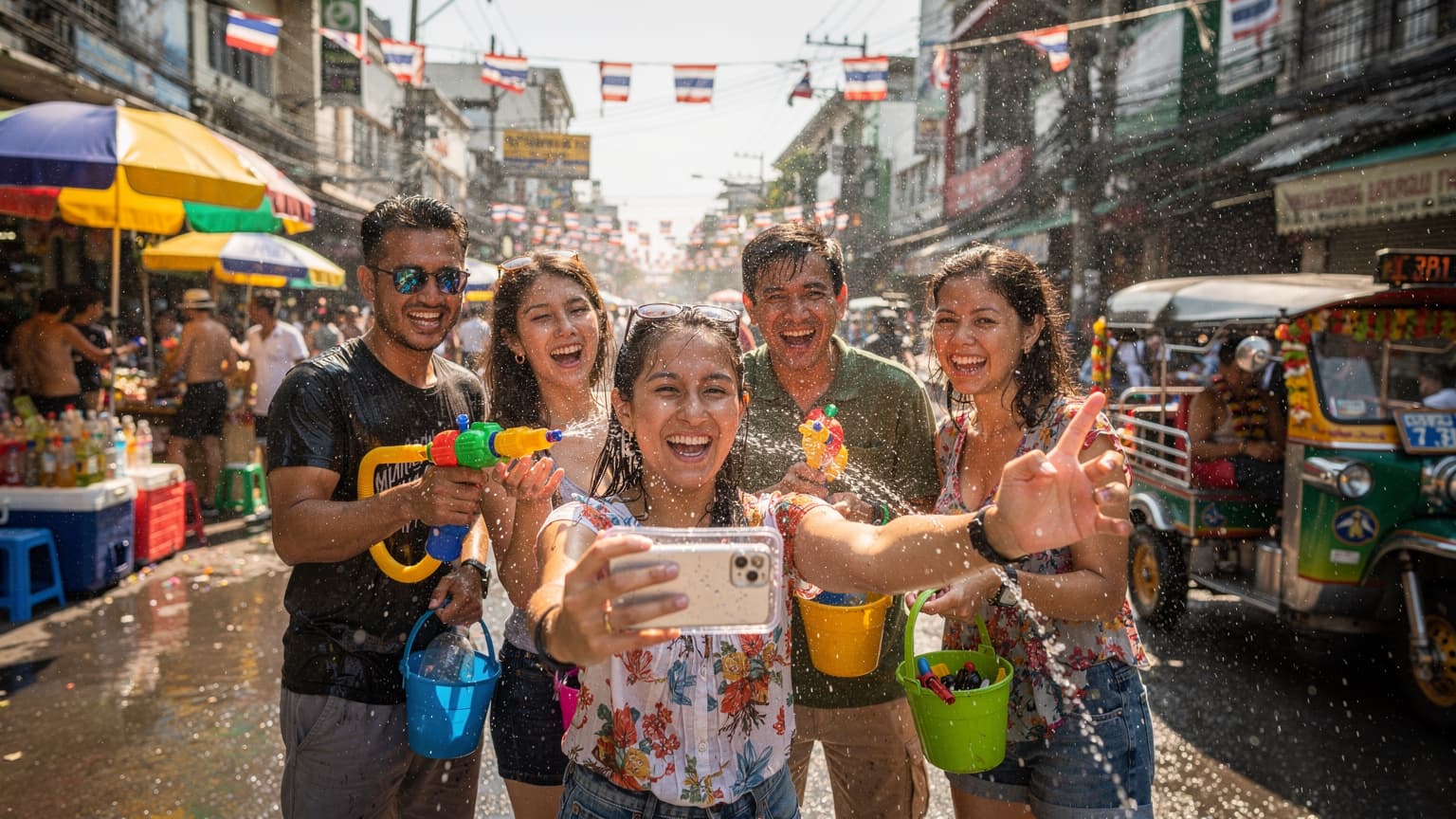


Understanding Songkran: Beyond the Water Fights
Songkran isn't just about water fights, though those are definitely the most visible and exhilarating part. It's the Thai New Year, a time for purification, respect, and family reunions. While the streets erupt in joyous (and sometimes chaotic) water battles, you'll also find quieter traditions like visiting temples, offering food to monks, and gently pouring scented water over Buddha statues and the hands of elders as a sign of respect and blessing.
The Festival's Scope: Where to Expect the Biggest Splashes
The festival officially runs from April 13th to 15th, but in many places, the celebrations extend for several days, especially in popular tourist hubs. Bangkok, Chiang Mai, and Phuket are known for their massive water fights. In Bangkok, areas like Silom Road and Khao San Road become epicenters of water-based revelry. Chiang Mai, with its ancient moat, turns into a city-wide aquatic playground. Smaller towns might have more localized, community-focused events.
Knowing where the biggest crowds and water action will be helps you plan your day, especially if you're navigating with little ones. Remember, it's not just a quick sprinkle, you'll be soaked from head to toe, so waterproof everything!
Cultural Nuances for Families
Teaching your kids about the cultural significance beyond the fun is a big part of the travel experience, in my opinion. We always try to explain why people are doing what they're doing. For Songkran, that means talking about new beginnings and washing away bad luck. It also means reminding them to be respectful, not to splash monks or very elderly people, and to always smile and say 'Sawasdee Pee Mai' (Happy New Year) in Thai. A little cultural sensitivity goes a long way, especially when you're asking a local for directions or trying to order food.
Why an eSIM is Your Best Friend for Songkran Family Travel
When you're wrangling a family through a foreign country, especially during an event as dynamic as Songkran, reliable connectivity isn't a luxury, it's a necessity. Forget fumbling with tiny SIM cards or stressing about your carrier's exorbitant roaming charges. An eSIM for Thailand simplifies everything.

No More Roaming Fees: The Parent-Approved Budget Hack
This is probably the biggest win for any family traveler. We've all seen those horror stories of returning home to a multi-hundred dollar phone bill. With an eSIM, you purchase a data plan for a fixed price before you even leave home. No surprises, no hidden fees, just straightforward data. This means more money for delicious street food and those inevitable theme park souvenirs (my kids always manage to find something!).
Instant Activation, Anywhere, Anytime
Picture this: you've just landed at Suvarnabhumi Airport, the kids are tired, and you need to call a Grab (Thailand's version of Uber) or check your hotel booking. With a physical SIM, you'd be hunting down a vendor, waiting in line, and then fumbling with a tiny tool to swap cards. With an eSIM, you can often activate it before you even board your flight, or certainly within minutes of landing. It's a lifesaver for tired parents. If you're encountering issues, EastESIM's page on eSIM Stuck on Activating? 3 Fast Fixes to Get Online 2026 is a great resource.
Keep Your Home Number Active (The Grandparent Lifeline)
One of the beauties of an eSIM is that it allows you to keep your primary physical SIM active simultaneously. This means you can receive calls and texts on your home number (important for those emergency calls from grandparents or school) while using your eSIM for all your data needs in Thailand. No more missing important messages or having to constantly swap SIMs. It's a seamless experience, perfect for multi-tasking parents.
Choosing the Right eSIM for Your Family's Data Needs
This is where the planning love language comes in. You're not just buying data for yourself, you're buying it for a small army of screen-addicted individuals. Think about how much data your family typically consumes. My rule of thumb is always to over-estimate, especially with kids involved.
Data Plan Sizing: Disney+, Roblox, and Offline Maps
Let's be real, a family of four, with two kids aged 8 and 12, will burn through data faster than a bucket of water at Songkran. My kids, bless their hearts, consider Disney+ and Roblox essential travel companions. So, when I'm looking at plans, I'm thinking about:
- Streaming: Two kids streaming Disney+ in the hotel room after a long day of splashing, or during a quiet moment at a cafe, can easily chew through 5-10GB per hour, per device.
- Gaming: Online games like Roblox or Nintendo Switch Online use less data than streaming, but it still adds up.
- Navigation: Google Maps, even with some offline maps downloaded (a pre-trip essential!), will use data for real-time traffic and points of interest.
- Communication: WhatsApp calls, sharing photos with family back home.
- Parental Perks: My own social media scrolling, checking emails, and maybe a quick YouTube video after the kids are asleep.
For a week-long trip, I'd honestly aim for a minimum of 30-50GB for the primary device that will be hot-spotting, or individual 10-20GB plans if everyone has an eSIM-compatible phone. It sounds like a lot, but trust me, it's better to have too much than to be scrambling for a top-up when you're trying to find your hotel in a downpour.
Multi-Country Plans vs. Thailand-Specific Options
If Thailand is just one stop on a grand Southeast Asian adventure, a multi-country eSIM might be a good fit. EastESIM offers options like the Multi-Country Asia eSIM Strategy: How to Stay Connected Across 8 Countries in 30 Days. However, for a dedicated trip to Thailand, a country-specific plan often gives you more data for your money and better local network prioritization. Always check the fine print for covered countries and data allowances.
Carrier Options in Thailand: AIS, TrueMove H, and DTAC
Thailand has three major carriers: AIS, TrueMove H, and DTAC. All offer reliable 4G/5G coverage in major cities and tourist areas. For Bangkok, in particular, you might find our guide to Bangkok 5G eSIM: AIS vs TrueMove vs DTAC — Carrier Speed Tests for Tourists useful. During Songkran, with huge crowds, network congestion can be a factor, so choosing a robust carrier is wise. EastESIM partners with these top providers to ensure you get the best connection.
| Carrier | Strengths (Tourist Perspective) | Coverage during Songkran (Estimated) |
|---|---|---|
| AIS | Widest 5G coverage, strong in urban areas and islands. Generally considered premium. | Excellent in major cities (Bangkok, Chiang Mai), good in smaller towns. Potential for congestion in festival hotspots. |
| TrueMove H | Very competitive pricing, good performance, especially in tourist zones. Strong 5G rollout. | Very good in most populated areas, decent even in some rural festival spots. |
| DTAC | Reliable network, often good value plans. Strong in Bangkok and central Thailand. | Good in main cities, may be slightly less robust than AIS/TrueMove in very remote areas, but fine for festival hubs. |
Pre-Trip Checklist: Getting Your Devices Ready
Preparation is key, especially with a family. A few simple steps before you leave can save you a lot of headaches (and potential meltdowns, from both kids and parents) once you're on the ground.
Ensuring eSIM Compatibility for All Devices
First things first, check if all the devices you plan to use with an eSIM are actually compatible. Most newer iPhones (XS and above), Samsung Galaxy phones (S20 series and newer), and Google Pixel phones (3a and newer) support eSIMs. Don't assume, always double-check the manufacturer's specs. If your child's older iPad doesn't have eSIM support, you'll need to rely on Wi-Fi or tethering from your main device.
Downloading Essential Apps Before You Fly
Seriously, do this. Before you even get on the plane, make sure you have these downloaded and ready:
- Offline Maps: Download the entire region of Thailand you'll be visiting in Google Maps or Maps.me. This is a lifesaver when you lose signal (it happens, even with the best plans) or are trying to conserve data.
- Translation Apps: Google Translate (with Thai language pack downloaded for offline use) or Pleco.
- Ride-Sharing: Grab (essential for getting around Bangkok and other cities).
- Communication: WhatsApp (if not already installed).
- Kids' Entertainment: Download movies/shows on Disney+, Netflix, YouTube Kids, and any offline games. This is non-negotiable for flights, long car rides, or when you just need a moment of peace.
These pre-loaded apps mean you won't be scrambling for Wi-Fi or burning through data just to get set up.
Activating Your eSIM: Step-by-Step Guide
Activating your EastESIM Thailand eSIM is straightforward. I usually do this a day or two before departure, or even while waiting at the gate.
- Purchase Your eSIM: Visit the EastESIM website and choose your desired Thailand data plan. You'll receive a QR code via email.
- Scan the QR Code: On your iPhone (Settings > Cellular/Mobile Data > Add eSIM) or Android (Settings > Network & internet > SIMs > Add more), choose to add a new eSIM and scan the QR code.
- Label Your eSIM: Give it a clear name like "Thailand Data" so you know which line is which.
- Set as Primary for Data: Ensure your new eSIM is set as your primary line for cellular data. Keep your home SIM active for calls/texts, but disable its data roaming.
- Check APN Settings (if necessary): Most EastESIM eSIMs configure APN automatically. If you have issues, check your eSIM provider's instructions, but it's rare to need manual adjustment.
I recommend doing a quick test at home if possible, just to make sure the setup process is smooth. This reduces any pre-travel jitters.

On-the-Ground Connectivity: Tips and Tricks
Once you're in Thailand, the fun begins, and so does the real-world test of your data plan. Having a solid strategy for staying online will make a huge difference.
Hotspotting for the Family: One eSIM to Rule Them All?
For my family, I usually get a generous data plan on my phone (the command center, if you will) and use it as a mobile hotspot for the kids' devices. This is generally more cost-effective than buying individual eSIMs for every iPad and secondary phone. However, be aware that hot-spotting can drain your phone's battery quickly, so a portable power bank is absolutely essential.
My husband also usually gets his own eSIM, just in case we split up, or if my phone battery dies. It's a good redundancy strategy, especially when you're in crowded festival areas like the Old City in Chiang Mai.
Connectivity in Theme Parks and Cruise Ships
This is a common concern for parents. Theme parks in Thailand, like Dream World or Siam Amazing Park, will generally have decent cell coverage, but during peak Songkran crowds, you might experience some slowdowns due to network congestion. Plan for this: download maps of the park beforehand, and set clear meeting points if your data is spotty. Disney+ will likely buffer a bit if two devices are trying to stream simultaneously in a crowded park, so manage expectations with the kids.
Cruise ships are a different beast. While your eSIM will work in port, once you're out at sea, you'll be relying on the ship's satellite Wi-Fi (which is notoriously expensive and slow) or a specific maritime roaming plan. Your EastESIM eSIM is for terrestrial networks, so expect to be offline on open waters. Pre-downloading plenty of content for the kids before boarding is crucial for any cruise segments.
Using Offline Maps and Pre-Downloaded Content
I cannot stress this enough: **download everything you can offline.** Google Maps, Netflix shows, Spotify playlists, Kindle books, educational apps, and even audiobooks. This not only saves data but also ensures entertainment and navigation are available even when there's no signal, or if your phone battery gives out. Imagine being stuck in a taxi in heavy Bangkok traffic with two bored children and no Peppa Pig, that's a nightmare I wouldn't wish on anyone.
Managing Screen Time and Device Usage for Kids Abroad
Travel is an amazing opportunity for kids to learn and explore, but let's be realistic, devices are often part of the equation. The key is balance and using the tools available to you.
Parental Control Features and eSIM Lines
Many modern phones have robust parental control features, like Apple's Screen Time or Google's Digital Wellbeing. These work independently of the eSIM line itself. You can set app limits, downtime schedules, and content restrictions, which will apply regardless of whether the device is on Wi-Fi or cellular data via the eSIM. This is incredibly helpful for managing how much time the kids spend on YouTube Kids versus, say, observing a traditional Thai dance performance.
However, the eSIM itself doesn't offer parental controls like filtering content or limiting specific app data usage *through the network*. For that, you'll rely on the device's built-in features or third-party apps like Bark or Qustodio, which you should install and configure *before* you leave home. They work over any internet connection, including your eSIM data.
Setting Clear Expectations for Data Usage
Before the trip, sit down with your kids and explain the data situation. "We have X amount of data for the trip. If you stream all day, we might run out, and then no more Roblox until we get back to the hotel Wi-Fi." It sounds harsh, but it teaches them about resource management. My kids (ages 10 and 12) respond surprisingly well to understanding the 'why' behind the limits.
- Designate "No-Screen Zones": During meals, cultural visits, or family conversations, devices are put away.
- Time Limits: Use the built-in device parental controls to set daily limits for specific apps or overall screen time.
- Wi-Fi First Rule: Always encourage connecting to hotel or cafe Wi-Fi before using cellular data, even if you have a huge plan.
These conversations help avoid arguments and make the kids feel more involved in the travel planning.
Troubleshooting Common eSIM Issues on the Go
Even with the best preparation, tech hiccups happen. Don't panic! Most eSIM issues are easily resolved.
"No Service" or Slow Data Speeds
If you're seeing "No Service" or experiencing painfully slow data, try these steps:
- Restart Your Phone: The classic IT solution, but it often works wonders.
- Check eSIM Settings: Go to your phone's Cellular/Mobile Data settings. Ensure your EastESIM eSIM is turned ON and selected for cellular data. Make sure Data Roaming is ON for your eSIM (it's not roaming if it's a local plan, but the setting still needs to be enabled for it to connect).
- Network Selection: Sometimes, manually selecting the network can help. In settings, go to Network Selection and try switching between AIS, TrueMove H, or DTAC.
- Toggle Airplane Mode: Turn Airplane Mode on for 30 seconds, then off. This often forces a reconnection to the network.
- Check for Outages: While rare, local network outages can occur, especially during major events like Songkran with high traffic. Ask a local if their service is also down.
If all else fails, reach out to EastESIM support. They can often diagnose issues remotely.
What to Do When Your Data Runs Out
It happens, especially with hungry streaming kids! The good news is that topping up your EastESIM eSIM is usually very easy:
- Log into Your EastESIM Account: Use the app or website.
- Select Your Active eSIM: Find the Thailand plan you're currently using.
- Choose a Top-Up Option: Select a data package that suits your needs.
- Complete Purchase: Pay with your credit card. The data is usually added to your eSIM within minutes.
Having a small emergency data pack on standby (maybe a 1GB plan) on a secondary eSIM profile can also be a good idea, just in case you run out and can't top up immediately for some reason. For more general troubleshooting, remember to check our FAQ page.

Safety and Security with Your Connected Devices
Songkran is generally a very safe and joyous festival, but like any crowded event, it pays to be vigilant, especially with your devices.
Waterproofing Your Phone (Seriously!)
This is not optional for Songkran. Your phone *will* get wet. Invest in a good quality waterproof pouch or case. I'm talking IP68 rated, fully submersible. Not just water-resistant. Even if you're not actively participating in the water fights, an errant splash from a passing tuk-tuk or a playful child is almost guaranteed. My kids' iPads go into waterproof bags even when they're just watching movies in the hotel lobby, just in case.
Keeping Devices Secure in Crowds
Pickpocketing can happen in any crowded environment. Keep your phone in a secure, zipped pocket, ideally on the inside of your clothing. Avoid back pockets or open bags. When using your phone for navigation, be aware of your surroundings. A cross-body bag worn under your arm is often a safer bet than a backpack in dense crowds.
Public Wi-Fi vs. eSIM Data: A Security Perspective
While hotel Wi-Fi is generally safe, be cautious about connecting to unsecured public Wi-Fi networks in cafes or airports. These can be vulnerable to security breaches. Your eSIM data connection is inherently more secure, as it's a direct connection to the mobile network. For any sensitive transactions, like online banking or logging into personal accounts, always use your eSIM data or a trusted VPN over any public Wi-Fi.
Making the Most of Songkran with Seamless Connectivity
With your eSIM strategy in place, you're ready to dive into the Songkran celebrations with confidence. Connectivity allows you to embrace the spontaneity of travel while maintaining that all-important parental peace of mind.
Capturing and Sharing Memories Instantly
One of the joys of travel is sharing your experiences. With reliable data, you can upload those incredible photos and videos of your kids having the time of their lives splashing water, almost in real-time. No need to wait until you get back to the hotel Wi-Fi. This is also great for sharing updates with family back home, letting them see the fun as it happens (and reassuring them everyone is safe and sound).
Navigation and Emergency Preparedness
Even with offline maps, real-time navigation is a game-changer when you're trying to find that specific street food stall in a bustling market or navigate back to your hotel after a full day of festival fun. In an emergency, having an active phone line for calls (via your home SIM) and data for quick information lookups (via your eSIM) is priceless. Knowing you can quickly contact emergency services or look up a hospital location provides immense reassurance.
Embracing the Unexpected (While Staying Connected)
Travel with kids rarely goes exactly as planned, especially during a vibrant festival. A child might get separated for a moment (a panic-inducing thought, I know), or you might stumble upon an unexpected local parade. With constant connectivity, you can easily reunite, adjust your plans on the fly, and research those spontaneous discoveries. It allows for a sense of freedom, even within a structured itinerary. Songkran is an incredible experience, and with a bit of planning around your family's connectivity, it can truly be unforgettable. Happy splashing, everyone!

Frequently Asked Questions
Will my EastESIM eSIM work on a cruise ship during Songkran?
No, EastESIM eSIMs are designed for terrestrial networks. They will work while your ship is in port in Thailand, but once you sail into open waters, you'll typically lose connection and need to rely on the ship's expensive satellite Wi-Fi or have a specific maritime roaming plan from your home carrier.
How much data do I really need for a family of four during Songkran?
For a week-long Songkran trip with two children (ages 4-12) who might stream and game, I'd recommend a minimum of 30-50GB for the primary device (used for hot-spotting) or 10-20GB per individual eSIM-compatible device. Streaming Disney+ and gaming can consume data quickly, so overestimating is safer than running out.
Can I use parental controls on my kids' devices with a EastESIM eSIM?
Yes, built-in device parental controls like Apple's Screen Time or Google's Digital Wellbeing work independently of the eSIM. You can set app limits and content restrictions, which will apply whether the device is on Wi-Fi or using cellular data from your EastESIM eSIM. The eSIM itself doesn't offer network-level parental controls.
Is it better to get a single large eSIM plan and hotspot, or multiple smaller plans for each family member?
For most families, purchasing one generous data plan on a parent's primary phone and using it as a mobile hotspot for other devices is more cost-effective. However, if family members might separate or if you need redundancy, having a second eSIM on another adult's phone is a good backup. Remember that hot-spotting can drain battery quickly, so a portable power bank is essential.
What should I do if my eSIM shows 'No Service' during the festival?
First, try restarting your phone or toggling Airplane Mode on and off for 30 seconds. Then, check your phone's Cellular/Mobile Data settings to ensure your EastESIM eSIM is active and selected for data, and that Data Roaming is enabled. If issues persist, try manually selecting a different local network (AIS, TrueMove H, or DTAC) in your settings.
Do I need to waterproof my phone for Songkran, even if I'm not actively participating in water fights?
Absolutely, waterproofing your phone is highly recommended. Songkran involves water being splashed everywhere, from buckets and water guns to passing vehicles. Even if you try to stay dry, an accidental splash is almost guaranteed. Invest in a high-quality, fully submersible waterproof pouch or case to protect your device.